0 ratings

Item #:
118492409
iFixit Repair and Upgrade Toolkit Compatible with Steam Deck
Item #:
118492409
BWP 427
Price Details
Excluding Shipping & Custom charges ( Shipping and custom charges will be calculated on checkout )
*All items will import from US
0 ratings
Write a review
In stock
 Imported from USA store
QTY:
Order now and get it around Sunday, July 12
Secured transaction
Ubuy works hard to protect your security and privacy. Our advanced payment security system ensures confidentiality by encrypting your information during transmission using AES (Advanced Encryption Standards) and SSL (Secure Socket Layer) protocols. Your payment details are 100% secure as we do not share your payment details with third party sellers.
Our Top Logistics Partners


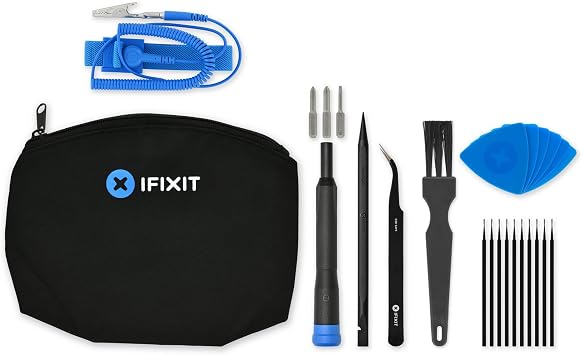
Empower Your Gameplay With the iFixit Steam Deck Repair and Upgrade Toolkit, you have the power to maintain, repair, and enhance your Steam Deck on your own terms.

Fast
Shipping

Free
Return*

Secure Packaging

100% Original Products

PCI DSS Compliance

ISO 27001 Certified


Note: Step Down Voltage Transformer required for using electronics products of US store (110-120). Recommended power converters Buy Now.


What Stands Out
Comprehensive Toolkit
Includes all essential tools for repair and upgrades, ensuring users have everything needed for maintenance, enhancing the Steam Deck's longevity and performance.
Steam Deck Compatibility
Specifically designed for the Steam Deck, providing precise fit and function, which simplifies the repair and upgrade processes for gamers looking to enhance their device.
User-Friendly Design
Ergonomically designed tools ensure comfortable handling, making repairs accessible to both experienced and novice users, promoting DIY fixes while saving on repair costs.
Product Details
| Item Weight | 1 lbs (450 grams) |
Who Should Buy?

-
Tech Enthusiasts
Ideal for users wanting to customize or upgrade their Steam Deck hardware for enhanced gaming performance.
-
DIY Repairers
Perfect for those who prefer to fix minor issues themselves rather than relying on professional repair services.
-
Gamers
Essential for gamers who want to maintain or improve their device's functionality to ensure optimal gaming experiences.

-
Casual Users
Not suitable for individuals who do not intend to open or modify their Steam Deck devices.
-
Limited Experience
Users with little to no experience in electronics repair may struggle with the toolkit's complexities.
-
Professional Technicians
Highly skilled techs might find the toolkit basic and lacking advanced tools for intricate repairs or modifications.
Product Description
iFixit Repair and Upgrade Toolkit Compatible with Steam Deck
Have any Query? Chat with us
Customer Questions & Answers
-
Question:
What tools are included in the iFixit Repair and Upgrade Toolkit for Steam Deck?
Answer: The iFixit Repair and Upgrade Toolkit for Steam Deck includes a variety of precision tools such as a Phillips screwdriver, a flathead screwdriver, a spudger, tweezers, and various other specialized tools designed for disassembling and upgrading devices. This toolkit is specifically curated to help Steam Deck users perform internal repairs or upgrades safely. For example, gamers can use it to replace the battery or upgrade the storage. By having the right tools, users can minimize the risk of damage to their device while ensuring the integrity of their upgrades. -
Question:
Is the iFixit Repair and Upgrade Toolkit easy to use for beginners?
Answer: Yes, the iFixit Repair and Upgrade Toolkit is designed with beginners in mind. Each tool is labeled and comes with helpful instructions on how to use them effectively. Moreover, iFixit provides online guides that walk you through each repair process step-by-step. This makes it convenient for those who might not have any prior repair experience. For instance, someone new to electronics can follow these guides to replace their Steam Deck's components without feeling overwhelmed. -
Question:
Can the iFixit Repair and Upgrade Toolkit be used on other devices?
Answer: While the iFixit Repair and Upgrade Toolkit is tailored for the Steam Deck, many of the tools included are versatile and can be utilized for repairing and upgrading a variety of devices. This could include smartphones, tablets, laptops, and gaming consoles. Therefore, if you own multiple gadgets, this toolkit can be a great all-in-one solution for tech enthusiasts who frequently engage in repairs or upgrades across different devices. -
Question:
Does the iFixit toolkit help with Steam Deck upgrades?
Answer: Absolutely! The iFixit Repair and Upgrade Toolkit is specifically designed to facilitate both repairs and upgrades on the Steam Deck. Users can easily open the device to upgrade components like the SSD or RAM, enhancing performance and storage capacity. Utilizing this toolkit helps ensure that the upgrading process is smooth and avoids potential damage. Many users have reported success in enhancing their gaming experience by upgrading their Steam Deck with the help of this toolkit. -
Question:
Are there any safety precautions I should take when using the iFixit toolkit?
Answer: Yes, it's advisable to take certain safety precautions while using the iFixit Repair and Upgrade Toolkit. Make sure to work in a clean and dry environment, and keep track of all small screws and parts. It's also important to power off your Steam Deck completely before beginning any disassembly or repair work. Following these precautionary measures helps ensure not only your safety but also protects your device from accidental damage during the process. -
Question:
How can I keep the iFixit toolkit in good condition?
Answer: To maintain the iFixit Repair and Upgrade Toolkit in good condition, store it in a dry and organized place, ideally in the case that it comes with. Regularly inspect the tools for any wear or rust, especially if they come into contact with moisture. Keeping the toolkit clean by wiping down the tools after use will help prolong their lifespan. Proper maintenance ensures that every tool remains functional and ready for use during your next repair or upgrade session. -
Question:
Is there a guide available for using the iFixit toolkit with Steam Deck?
Answer: Yes, iFixit offers an extensive online library of guides specifically designed for repairing and upgrading the Steam Deck using their toolkit. These guides are detailed and provide step-by-step instructions, complete with images and tips for different processes, like upgrading the SSD or replacing the battery. For someone who is not tech-savvy, these guides can be invaluable in simplifying complex tasks, making DIY upgrades or repairs much more manageable. -
Question:
What type of warranty comes with the iFixit toolkit?
Answer: While the iFixit Repair and Upgrade Toolkit itself does not come with a warranty, the tools are made from high-quality materials designed to withstand frequent use. This reliability means that users can expect the tools to last through multiple repairs and upgrades. It's important to use the tools as intended to ensure their longevity. This aspect makes the toolkit a worthwhile investment for gamers and tech enthusiasts who need reliable tools for their devices. -
Question:
Will the iFixit toolkit affect my Steam Deck's performance?
Answer: No, the iFixit Repair and Upgrade Toolkit will not affect your Steam Deck's performance directly. However, by allowing you to make necessary repairs and upgrades, it can significantly enhance your device's overall performance. For instance, if you upgrade your Steam Deck’s storage or battery using the toolkit, you could see improved load times and extended gaming sessions. The toolkit facilitates these enhancements without compromising the device's integrity. -
Question:
Where can I buy the iFixit Repair and Upgrade Toolkit Compatible with Steam Deck?
Answer: You can buy the iFixit Repair and Upgrade Toolkit Compatible with Steam Deck on Ubuy. Ubuy offers a convenient shopping experience and often carries various tech products, including the iFixit toolkit, allowing you to purchase online with ease.
iFixit Editorial Review
No editorial reviews found
Customer Reviews & Ratings
1 customers ratings
-
5 Star
100%
-
4 Star
0%
-
3 Star
0%
-
2 Star
0%
-
1 Star
0%
Review this product
Share your thoughts with other customers
Platform Trust & Buyer Confidence

MT
Mohd
Verified buyer
“The product received very good packaging & safe…Thank You”
16 June 2026 · via Trustpilot
SJ
Shawati
Verified buyer
“Accurate delivery timing given”
16 June 2026 · via Trustpilot
YB
Youcef
Verified buyer
“Not madly expensive like I thought, and much quicker than promised.”
15 June 2026 · via Trustpilot
LM
Leila
Verified buyer
“Never dealt with Ubuy before, but everything worked out great. Seamless cross border purchasing and shipping. Thanks!”
6/7/2026 · via Trustpilot
KA
Kwame
Verified buyer
“The process was smooth, with clear communication and timelines. This was my 1st purchase and I am really impressed. I will definitely be coming back.”
12 June 2026 · via Trustpilot
Secure Checkout
Global Delivery
Easy Returns
Genuine Products
Product Price History
Important information
- Limitations : For products shipped internationally, please note that any manufacturer warranty may not be valid; manufacturer service options may not be available; product manuals, instructions, and safety warnings may not be in destination country languages; the products (and accompanying materials) may not be designed in accordance with destination country standards, specifications, and labeling requirements; and the products may not conform to destination country voltage and other electrical standards (requiring use of an adapter or converter if appropriate). The recipient is responsible for assuring that the product can be lawfully imported to the destination country. When ordering from Ubuy or its affiliates, the recipient is the importer of record and must comply with all laws and regulations of the destination country.
- Not all the products listed on Ubuy are for sale, as Ubuy is a global search engine. Products are subject to export/trade regulations.
BWP 427
Order now and get it around Sunday, July 12
This item is not restrict in my country.(Please click on above link if this item is not restrict in your country, So our team will review and allow.)
QTY:
Secured transaction
PCI DSS compliant and ISO 27001:2022 certified, with encrypted payments and full buyer protection on every order.
Our Top Logistics Partners
Fastest cross-border delivery
Features & Benefits
- Ergonomic design provides a comfortable, non-slip grip for precise handling.
- High-quality S2 steel bits ensure exceptional durability for repairs.
- Comprehensive toolkit allows for routine maintenance and upgrades.
- Perfect for enhancing device performance and adapting to gaming needs.
- Includes essential tools like spudger, tweezers, and anti-static wrist strap.
- Compatible with various Steam Deck models for versatile repairs.
Ubuy Assurance
Experience worry-free shopping with 100% original products, PCI DSS-compliant payment security, ISO 27001-certified data protection, the fastest cross-border delivery, free returns *, and secure packaging on every order.